Thursday, May 16, 2013

Using Python and Google Maps API to Geocode addresses

Anyone who has used Python scripting in the past knows how powerful it can be. With the xml.dom.minidom module built into to the python standard library, it allows us to string and parse elements from an xml document. When making a call to the Google Maps API directions service results can be returned in either json or xml. Personally I prefer to use xml because it is simpler to manipulate and understand.

When using the  Google Directions API the returned xml file contains gobs of data including distance in meters from origin to destination, time in seconds for origin to destination, geographic coordinate pair of destination and origin, as well as details about each leg of the directions. The only catch is, Google limits the rate at which users can request data. There is a limit for calls per seconds as well as a daily cap on total requests per 24 hour period.

The example python script below may give you a few ideas on how you can use Google Maps to geocode small batches of street addresses simply with Python. A similar script could also be implemented into ArcGIS field calculator when represented as a function.

A practical and simple example web application which generates a HeatMap using the HeatMapAPI and displays on a Google Map available here.


Related Posts:


An example python script:

##Importing Modules
import os, urllib, urllib2, time, csv 
from xml.dom.minidom import parseString


origin = "Shippensburg_Shopping_Center"
destinations = "addresses.txt"
f = csv.reader(open('BATCH5.csv'))

CustomerNumber, HomeAddress1, POSCashEquivalentQ, SalesDate, MediaTypeName, MediaTypeID = zip(*f)

addresses = HomeAddress1
for i, rawaddress in enumerate(addresses):
    address = rawaddress.strip().replace(' ','_').replace('.','').replace('-','') + "_17257"
    pos_address = rawaddress.strip()
    print("Processing: " + address)
    #
    # Request data from the Google API
    #


    url = "http://maps.googleapis.com/maps/api/directions/xml?origin=" + origin + "&destination=" + address + "&sensor=false"
    xmlFile = urllib.urlretrieve(url,'test.xml')
    xmlFileOpen = urllib2.urlopen(url).read()
    xmlFileDom = parseString(xmlFileOpen)
    #
    # Parse the XML file to find and grab the total duration value (seconds)
    # Notice the compound getElementsByTagName call, which grabs the entire 'duration' snippet, then parses out the duration value
    #
    xmlstatus = xmlFileDom.getElementsByTagName("DirectionsResponse")[0].getElementsByTagName("status")[0].toxml()
    apiStatus = xmlstatus.replace('<status>','').replace('</status>','')
    print(apiStatus)    

    try:
        xmlDuration = xmlFileDom.getElementsByTagName("duration")[-1].getElementsByTagName("value")[-1].toxml()
        xmlSeconds = xmlDuration.replace('<value>','').replace('</value>','')

    #
    # Parse the XML file to find and grab the total distance (meters)
    # Notice the compound getElementsByTagName call, which grabs the entire 'distance' snippet, then parses out the distance value
    #
    
        xmlDistance = xmlFileDom.getElementsByTagName("distance")[-1].getElementsByTagName("value")[-1].toxml()
        xmlMeters = xmlDistance.replace('<value>','').replace('</value>','')

    #
    # Parse the XML file to find and grab the geographic coordinates (I have no idea if you want these, but maybe you do.)
    # Notice the compound getElementsByTagName calls...
    #
    
        xmlLng = xmlFileDom.getElementsByTagName("end_location")[-1].getElementsByTagName("lng")[-1].toxml()
        xmlLat = xmlFileDom.getElementsByTagName("end_location")[-1].getElementsByTagName("lat")[-1].toxml()
        geoCoords = xmlLng.replace('<lng>','').replace('</lng>','') + "," + xmlLat.replace('<lat>','').replace('</lat>','')
        
    except IndexError:
        
    outdata = open('batch4_googleout.csv','a')
    outdata.write(pos_address + "," + address + "," + geoCoords + "," + xmlSeconds + "," + xmlMeters + "\n")
    outdata.close()

    #
    # Delete vars once they've outlived their usefulness
    #
    del(url,xmlFile,xmlFileOpen,xmlFileDom)
    del(xmlDuration,xmlSeconds)
    del(xmlDistance,xmlMeters)
    del(xmlLng,xmlLat,geoCoords,outdata)
    # The end of the "for i" loop is indicated by the line that is not indented (that is not in the loop).
    # If there's more items available in the 'addresses' list, then go back to the top of the loop and do the next one.
    # If there's no more items, then end the loop and move on to the commands below.
del(origin,addresses,address)
print ("Done")

 

Sunday, March 24, 2013

Get Mac like gesture support for Ubuntu 12.04 | Touchegg for Ubuntu

Ubuntu Gesture Control


Many Ubuntu users would like to have gesture control over some of their applications to make workflows easier, and make the feel of Ubuntu more natural. Apple's multi-touch track-pad and corresponding gesture recognition, is by far the best implementation of gesture tracking we've seen yet. Fortunately developers have created a Unix application written in C+ that attempts to given Ubuntu/Linux users similar multi-touch gesture control over some of their applications.

Install Touchegg and uTouch:


Touchegg combined with uTouch creates an editable config (.conf) file to enable multi-touch gestures and their actions.

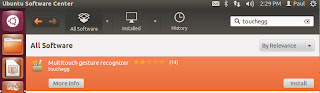
- Open the Ubuntu software center and do a search for "touchegg"

- Click install and wait for the installation to be complete.
- If you have not previously installed uTouch you will need to do so. uTouch can also be download and installed from the Ubuntu software center. "This meta package provides a development environment for building gesture aware applications."

Download uTouch gesture recognition from Ubuntu software center
Meta package to install gesture libraries and tools. Utouch

- With both of these packages installed you should now have an editable configuration file.

--> Editing the .conf file.

- The config file can be found in this directory:
~/.config/touchegg/touchegg.conf

- To edit the config file start a new terminal session and enter this command:
gedit ~/.config/touchegg/touchegg.conf

- More details about editing the configuration file can be found at the developer webpage.

Related posts:

- Easy stroke gesture recognition
- How to move Ubuntu 12.04 unity launcher bar


Friday, March 8, 2013

'sudo apt-get update error', slow mirror: Ubuntu 12.04

When attempting to update the newest long term release of Ubuntu, Ubuntu 12.04 LTS, some users have experienced 'sudo apt-get update' error when trying to update. One reason for this message to appear could be that the mirror you are trying to download updates from does not serve Ubuntu 12.04 updates yet. Also some users may be experiencing unusually low download speeds of updates. This slowness has been alleviated by the ability to select the update mirror closest to your location.

apt-get: Using closest mirror

To configure apt-get to use a good mirror based on your location place the below text into the first line of /etc/apt/sources.list

deb mirror://mirrors.ubuntu.com/mirrors.txt precise main restricted universe multiverse 
deb mirror://mirrors.ubuntu.com/mirrors.txt precise-updates main restricted universe multiverse 
deb mirror://mirrors.ubuntu.com/mirrors.txt precise-backports main restricted universe multiverse 
deb mirror://mirrors.ubuntu.com/mirrors.txt precise-security main restricted universe multiverse

This should be all that is needed to get updates from the closest mirror geographically.

apt-get: Closest mirror GUI

To download packages from the best server you will need to change/update a few settings in the Ubuntu Software Center application.

1. Begin by launching the software center.

2. Select edit from the menu bar, then select Software Sources. ..
Software Sources
3. Click the drop down arrow for the Download From options.
Software Sources
4. Choose other.
choose a download server ubuntu 12.04
5. Click "Select Best Server."
6.  Software center will now perform a series of tests to find the best mirror for your location.

testing of download servers
 Related Posts:
Related Posts Plugin for WordPress, Blogger...