 |
NZXT Source 210 ELITE Midtower Case
|

For this build the Gigabyte Intel Z77 LGA 1155 Dual UEFI BIOS ATX Motherboard GA-Z77-DS3H
 was used. Installation of OS X 10.8.3 (later 10.8.4) is nearly as simple as installing a Windows operating system. Changing SATA mode in bios to AHCI is the only bios preference that needs to be changed before beginning the installation.
 When combined with an Intel Core i5-3570K Quad-Core Processor
 this machine boasts phenomenal geek bench scores, handling many intense operations with ease. To further improve on this build without needing to modify the installation method an Intel Core i7-3770K Quad-Core Processor
 could be substituted for the 3570K. Both of these processor options permit the use of Intel HD4000 integrated graphics, however this is not recommended if you would like use of a VGA port, still common on many monitors.
 is an excellent choice ($55.00). This card would not be recommended for transcoding/editing video, but it is a great choice for the everyday user or music production center.
 or for Logic Pro X users, a Corsair Vengeance 16GB (2x8GB) DDR3 1600 MHz Desktop Memory Kit
 should be used to provide ample room for loading large virtual instruments or intense multi tasking.
 We're almost done with this build except for a power supply. When choosing a power supply you want to be sure you think ahead for future expansions. Sure, 4 SATA power ports and one 6-Pin PCI may be enough now, but not when you want to add a few more hard drives or optical drives or maybe even two graphics cards bridged via SLI. It may seem like a waste of money to purchase a high end power supply but it will save you from many headaches in the future. I have found that some of the lower end power supplies do not even have a long enough CPU power cable to reach the motherboard if the case requires bottom mounting of the power supply (like this NZXT Case). Also an efficient power supply can drastically reduce system temperatures, mainly by reducing case temperatures, maintaining a cooler environment can be critical to prolonging system life and pushing a higher over-clock.
This Corsair CX Series 750 Watt ATX/EPS Modular 80 PLUS Bronze Power Supply
is an excellent choice. It provides 2 PCI-E, 6 SATA, and 4 4-Pin peripheral connectors, all while being rated 80+ Bronze efficiency. Also the modular cabling system allows you to connect only the cables you need so as not to interfere with airflow and reducing clutter inside the case.
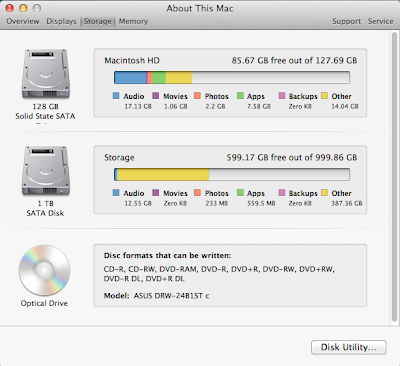
A Look at Specifications:




Multibeast Settings:


After completing the MultiBeast installation, while booting, the Apple boot screen would not go away, and the progress indicator would spin indefinitely. At this time I was using a VGA display which is not supported by the Apple HD4000 kernel extension. After switching to an HDMI display I was no longer haunted by the eternal Apple boot screen, but rather an astoundingly quick boot followed by a complete loss of signal to the HDMI display. After trying the go to troubleshooting technique of unplugging and re-inserting the HDMI cable in the motherboard to no avail, I realized that the computer had booted completely but left me with no video signal.
Using boot flag PCIRootUID=1, the system would boot completely, but the HD4000 graphics were not functioning as they should, and appeared to be using only basic generic drivers/kexts rendering the graphics flickering and laggy. I thought, at least now I will be able to test the audio, NOPE! No audio output or input options were available in System Preferences>>Audio.
After installing, uninstalling, and reinstalling various drivers for Intel HDA with only partial successes, cracking and popping, but now with available inputs and outputs displayed in Audio preferences, I reinstalled OS X Combo Update 10.8.4 to reset all audio kexts I had messed with. This time booting with PCIRootUID=0 and using a GeForce 8400 GS graphics card I was able to boot flawlessly into OS X Mountain Lion 10.8.4 with adequate graphics performance and crystal clear audio!
It would seem to me that the Intel HD 4000 graphics may not be fully or properly supported on the Gigabyte Z77-DS3H motherboard or within OS X. For those considering a similar build I recommend ditching the integrated graphics and spending a few bucks on a well supported Nvidia graphics card. This will surely save you much head banging while installing your build.


After completing the MultiBeast installation, while booting, the Apple boot screen would not go away, and the progress indicator would spin indefinitely. At this time I was using a VGA display which is not supported by the Apple HD4000 kernel extension. After switching to an HDMI display I was no longer haunted by the eternal Apple boot screen, but rather an astoundingly quick boot followed by a complete loss of signal to the HDMI display. After trying the go to troubleshooting technique of unplugging and re-inserting the HDMI cable in the motherboard to no avail, I realized that the computer had booted completely but left me with no video signal.
Using boot flag PCIRootUID=1, the system would boot completely, but the HD4000 graphics were not functioning as they should, and appeared to be using only basic generic drivers/kexts rendering the graphics flickering and laggy. I thought, at least now I will be able to test the audio, NOPE! No audio output or input options were available in System Preferences>>Audio.
After installing, uninstalling, and reinstalling various drivers for Intel HDA with only partial successes, cracking and popping, but now with available inputs and outputs displayed in Audio preferences, I reinstalled OS X Combo Update 10.8.4 to reset all audio kexts I had messed with. This time booting with PCIRootUID=0 and using a GeForce 8400 GS graphics card I was able to boot flawlessly into OS X Mountain Lion 10.8.4 with adequate graphics performance and crystal clear audio!
It would seem to me that the Intel HD 4000 graphics may not be fully or properly supported on the Gigabyte Z77-DS3H motherboard or within OS X. For those considering a similar build I recommend ditching the integrated graphics and spending a few bucks on a well supported Nvidia graphics card. This will surely save you much head banging while installing your build.


